

Claude
Connect Thirdfy MCP to Claude. claude.ai and Claude Desktop custom connector, the Claude API MCP connector, and Claude Managed Agents.
Add Thirdfy to Claude so it can read markets and act for your agent, within the limits you set. Claude connects to Thirdfy as a remote MCP server at https://mcp.thirdfy.com/mcp.
In claude.ai you sign in with your Thirdfy account. The Claude API and Managed Agents send your agent key instead. Pick the Claude surface you use:
| Surface | Best for |
|---|---|
| claude.ai and Claude Desktop | Chat with Claude and let it run Thirdfy actions for you |
| Claude Code | Coding and terminal agents |
| Claude API | Your own app calling the Messages API |
| Claude Managed Agents | Hosted agents in Claude Console |
claude.ai and Claude Desktop
Custom connectors are in beta on Free, Pro, Max, Team and Enterprise plans. The Free plan allows one custom connector. For more, see Anthropic's guide Get started with custom connectors using remote MCP.
Thirdfy has two connector URLs:
| URL | Sign-in | What Claude can do |
|---|---|---|
https://mcp.thirdfy.com/mcp | Sign in with your Thirdfy account | Read and trade for the agent you choose, within the limits you set |
https://mcp.thirdfy.com/mcp/public | None | Public market signals, the catalog, help and email onboarding. No paid execution |
1. Add the connector
In claude.ai, open Customize → Connectors. Click + Add, then Add custom connector.

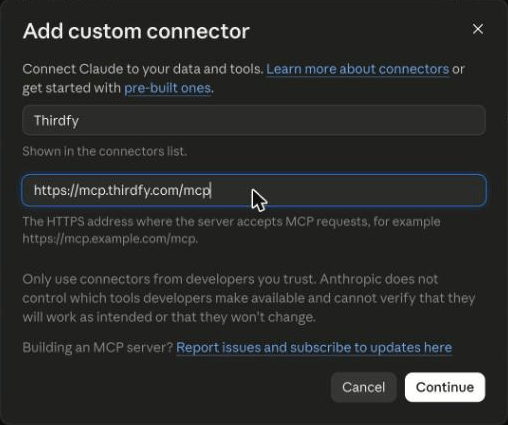
Name it Thirdfy, paste https://mcp.thirdfy.com/mcp as the URL, and click Continue.
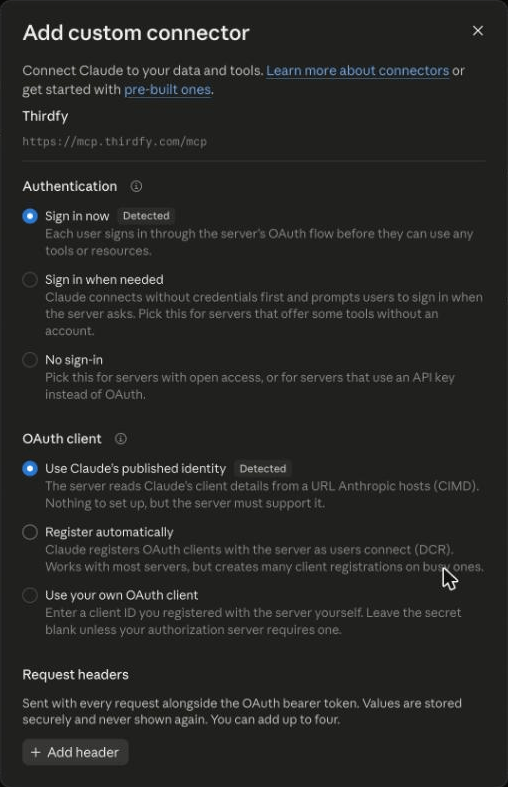
Claude detects that Thirdfy uses sign-in and picks the right options for you: Sign in now and Use Claude's published identity. Leave them as they are and click Add.
2. Sign in with Thirdfy
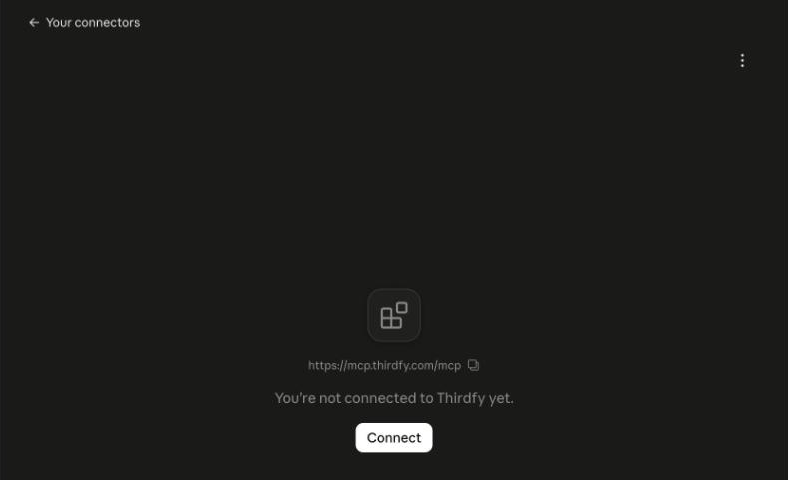
The connector is added but not connected yet. Click Connect.
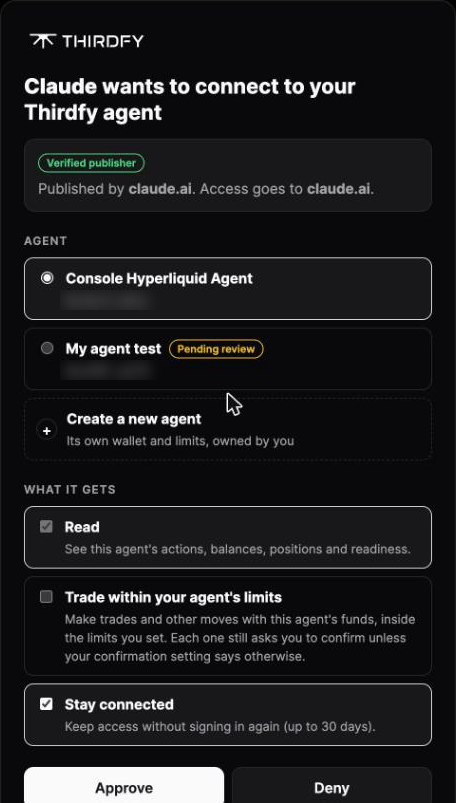
Claude opens the Thirdfy sign-in page at auth.thirdfy.com. Sign in with the same method you use on thirdfy.com (email, Google or wallet). Then choose what Claude gets:
- Agent. Pick the agent Claude acts for. The page shows Verified publisher: claude.ai, so you know the request comes from Claude. No agent yet? Click Create a new agent.
- Read. See the agent's actions, balances, positions and readiness. Always on.
- Trade within your agent's limits. Let Claude make trades and other moves with the agent's funds, inside the limits you set. Each trade still asks you to confirm. You can leave this off and add it later: Claude asks you to sign in again before its first trade.
- Stay connected. Keep access for up to 30 days without signing in again.
Click Approve.
You're back in Claude with Connected to Thirdfy. The connector page lists Thirdfy's tools. By default each one is set to Needs approval, so Claude asks before it uses a tool. You can change this per tool.
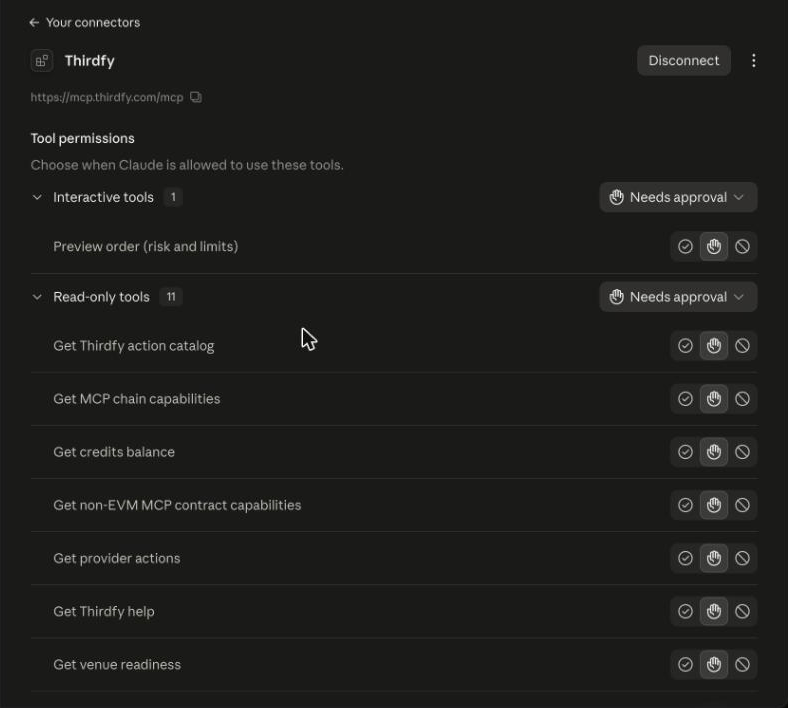
On Team and Enterprise, an Owner adds the connector under Organization settings → Connectors → Add → Custom → Web. Each member then clicks Connect and signs in with their own Thirdfy account, so each person's Claude acts only for their own agent.
3. Use it in a chat
Thirdfy is switched on for new chats. To check, click + at the lower left, choose Connectors and look for Thirdfy.
Ask in plain words:
The first time Claude uses a Thirdfy tool, it asks you. Click Allow once, or Always allow for that tool.
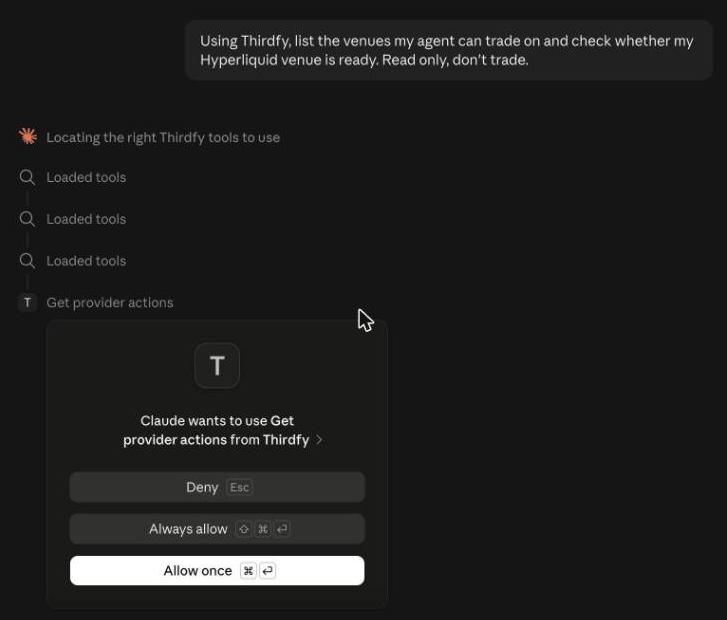
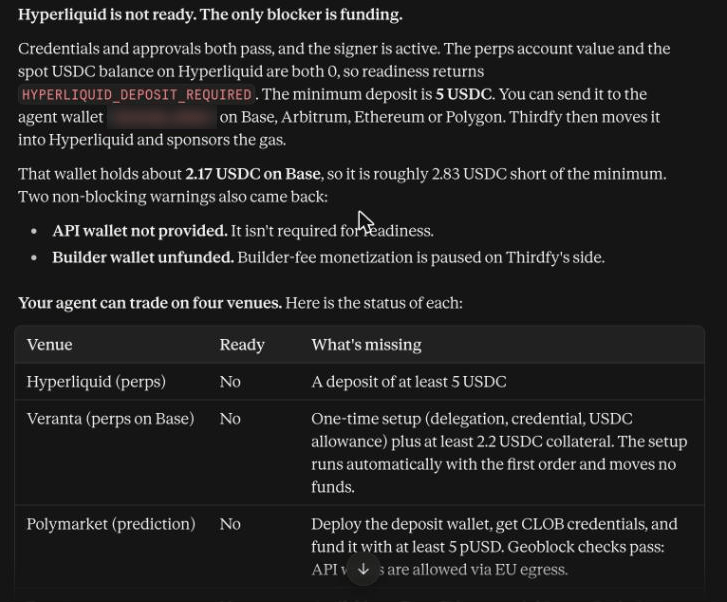
Claude reads your agent's venues and readiness and answers. Here it found that Hyperliquid needs a 5 USDC deposit and listed what each venue still needs:
4. Trade with Claude
More to ask:
Before a trade, Claude previews it. You see an order card with the size, your remaining limits and each policy check. Place the order with the card's Place order button, or confirm when Claude asks.
Thirdfy refuses any write that fails its checks: allowlist, daily limit, delegation, venue readiness or credits. If you granted Read only, Claude asks you to sign in again with Trade before its first write.
5. See or revoke access
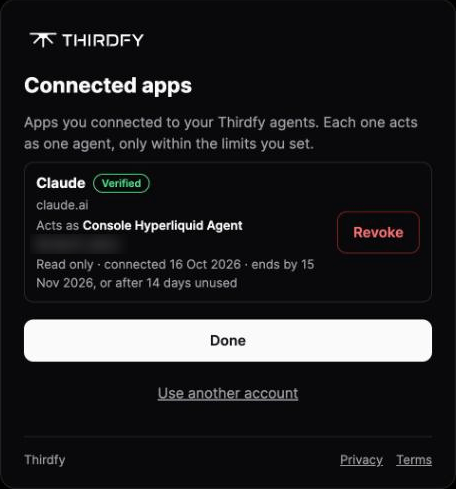
Every app you connect is listed at auth.thirdfy.com/connections: the agent it acts as, its access (read only, or read and trade), and when it ends. Revoke ends an app's access right away. If an agent changes owner, apps the previous owner connected lose access within the hour.
No agent yet?
Create one on the sign-in page. Click + Create a new agent at the end of the agent list, type a name and approve. If your account owns no agents yet, the sign-in page shows that form straight away.
Prefer an API key?
You can skip sign-in and send your agent key instead. Edit the connector and add a request header:
| Header | Value |
|---|---|
Authorization | Bearer agent-... |
Claude stores header values encrypted and sends them with every request. On Team and Enterprise everyone in the organization shares a connector's header, so use a key for an agent the whole team may operate.
Don't paste the key into the chat for Claude to pass as a tool argument. Sign in, or use the header.
Claude Desktop
In Claude Desktop, add Thirdfy the same way, under Customize → Connectors. Thirdfy is a remote server, so use a custom connector. Desktop extensions (.mcpb) are for local servers only.
Claude API
Use this when your own app calls the Messages API. The API connects to remote MCP servers with the MCP connector (beta):
- Pass Thirdfy in
mcp_servers, with your agent key asauthorization_token. Thirdfy receives it as the bearer token. - Turn it on with an
mcp_toolset.
See Anthropic's MCP connector docs.
To let the model call only some tools, set default_config: {"enabled": false} on the toolset and list the allowed tools in configs. For example, allow only getProviderActions, getVenueReadiness and agentRun.
The MCP connector is available on the Claude API and Microsoft Foundry. It is not available on Amazon Bedrock or Google Cloud.
Claude Managed Agents
Claude Managed Agents runs your agent in Anthropic's hosted sandbox. To connect it to Thirdfy:
- In Claude Console, create or open an agent.
- Add an MCP server: name
thirdfy, URLhttps://mcp.thirdfy.com/mcp. Add a matchingmcp_toolsetin the agent's tools. - Store your Thirdfy agent key as a
static_bearercredential in a vault, withmcp_server_urlset tohttps://mcp.thirdfy.com/mcp. - Attach the vault (
vault_ids) when you start a session. Credentials match the server by URL.
If your environment limits outbound hosts, allow mcp.thirdfy.com or set allow_mcp_servers: true. Anthropic's guide: MCP connector for Managed Agents.
No key yet? Run the email onboarding once in claude.ai or with the Agent CLI, then store the key in the vault.
Troubleshooting
| Issue | Fix |
|---|---|
| Connector shows offline | Check the URL is exactly https://mcp.thirdfy.com/mcp, then reconnect |
| Claude asks you to connect again | Your sign-in ended or was revoked. Click Connect and sign in |
| The sign-in page lists no agents | Create an agent first |
| Writes ask for more access | You granted Read only. Sign in again and tick Trade |
401 Authentication required (API, Managed Agents) | Send the Authorization: Bearer agent-... header |
AGENT_IDENTITY_MISMATCH | Claude passed a different key in tool arguments. Remove it; the header key is used |
| Claude skips the OTP step | Ask it to call startEmailOnboarding, then completeEmailOnboarding with your code |
| A write is refused | Run getVenueReadiness for that venue and finish the setup it lists |